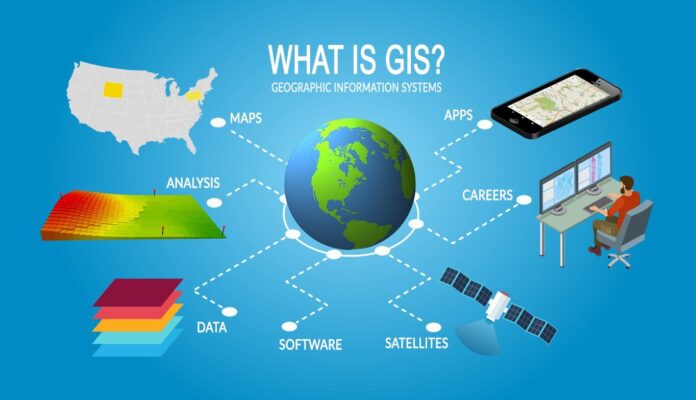
I’ve got a map open on one monitor and notes scattered everywhere—because GIS software has quietly become one of those tools that touches far more of our lives than most people realize.
If you’ve ever checked a delivery route, looked at flood maps, or analyzed where to open a new business, you’ve already benefited from it. Maybe without knowing.
What exactly is GIS software, and why does it matter?
At its core, GIS software (Geographic Information System software) is used to capture, analyze, and visualize data tied to locations on Earth. Sounds academic. But in practice? It’s how city planners decide where to build roads, how environmental scientists track climate change, and how companies figure out where their customers actually are.
The top tools all revolve around the same idea: layering information on maps. Roads over population data. Weather patterns over farmland. Sales data over ZIP codes. When you see those layers interact, patterns jump out. Sometimes obvious. Sometimes surprising.
And that’s the hook.
Why are people searching for GIS software right now?
Looking at how people talk about GIS software online, the intent is practical. They’re not asking “what is GIS?” in a textbook sense. They want to know:
-
Which tools are best right now
-
Whether free options are good enough
-
How steep the learning curve really is
There’s also a seasonal angle here. Winter months are planning months. Governments finalize budgets. Universities start new semesters. Businesses prepare expansion strategies. Mapping tools suddenly feel urgent.
The big players in GIS software (and how they differ)
Most conversations eventually circle around a few familiar names. During my own testing over the years, these two come up the most:
| Feature | ArcGIS Pro | QGIS |
|---|---|---|
| License | Paid (subscription-based) | Free & open source |
| Ease of Use | Polished, guided workflows | Flexible, steeper learning curve |
| Advanced Analysis | Excellent out of the box | Powerful with plugins |
| Best For | Enterprises, governments | Students, researchers, small teams |
ArcGIS Pro, developed by Esri, is often treated as the industry standard. It’s widely used by governments and large organizations, partly because of its support ecosystem and deep documentation. Esri’s official site explains their platform clearly if you want to see how far it goes: https://www.esri.com/en-us/arcgis/products/arcgis-pro/overview
QGIS, on the other hand, is open-source and community-driven. I still remember the first time I installed it—no cost, no trial clock ticking down, just raw capability. The learning curve is real, but the flexibility is impressive. The official QGIS project site is a good place to explore its ecosystem: https://qgis.org
Game changer.
Pricing tiers and system requirements (the part people don’t love)
Let’s be honest. Pricing often decides everything.
Most commercial GIS software tools follow a subscription model now. ArcGIS Pro typically ranges from entry-level licenses for individuals to enterprise pricing that scales quickly (especially once you add extensions for 3D analysis, spatial statistics, or network modeling).
System-wise, these tools aren’t lightweight:
-
Windows 10/11 (most commercial GIS tools still favor Windows)
-
16 GB RAM recommended (32 GB if you’re serious)
-
Dedicated GPU for 3D or large datasets
-
SSD storage (waiting on spinning disks is painful)
This reminds me of when I tried running heavy spatial analysis on an old laptop. I could make coffee, come back, and it would still be processing.
How GIS software is actually used in the real world
Here’s where things get interesting. GIS software isn’t just for maps that look nice in reports.
Urban planners use it to model traffic flow before roads are built. Public health teams map disease spread (a lesson that stuck after recent years). Retail chains analyze foot traffic and demographics before signing leases.
If you’re curious how mapping ties into real-time data and satellites, organizations like NASA openly publish geospatial datasets that many GIS tools can consume directly: https://earthdata.nasa.gov
And for global environmental and population data, Natural Earth remains one of my favorite resources—clean, well-documented, and easy to work with: https://www.naturalearthdata.com
Is GIS software hard to learn?
Short answer: yes. But not impossible.
Most beginners struggle with:
-
Coordinate systems (they feel abstract at first)
-
Data cleaning (messy datasets are the norm)
-
Knowing which tool to use among hundreds
But once it clicks, it really clicks. If you’re considering this, here’s what you should know: the payoff is worth it. Spatial thinking changes how you approach problems.
I’ve watched analysts go from overwhelmed to confident in a few months simply by working on real projects instead of tutorials alone.
Cloud-based GIS software: trend or transition?
One pattern I’ve noticed recently is the shift toward browser-based and cloud-hosted GIS platforms. Tools that once required heavy local installs now run partially—or fully—online.
This isn’t just convenience. It’s collaboration. Teams in different cities can work on the same spatial datasets without emailing files back and forth (a nightmare I don’t miss).
That said, for deep analysis and large datasets, desktop GIS software still dominates. For now.
Who should actually use GIS software?
Not everyone needs it. But many people don’t realize they already do.
-
Students in geography, urban studies, or environmental science
-
Businesses making location-based decisions
-
Journalists working with data-driven stories
-
NGOs tracking humanitarian or environmental impact
And yes, even content creators who want to visualize trends geographically (it’s more common than you’d think).
Common misconceptions about GIS software
One I hear a lot: “It’s just fancy maps.” Not true. Maps are the output, not the point.
Another: “You need to be a programmer.” Helpful, yes. Required, no.
And finally: “Free tools aren’t professional.” QGIS alone disproves that daily.
Why GIS software feels more relevant than ever
Between climate shifts, urban expansion, logistics complexity, and data overload, location has become the organizing principle. Where something happens is often as important as what happens.
That’s why GIS software keeps showing up in more industries every year. Quietly. Persistently.
And honestly? I get it now more than ever.
Sitting here in winter, watching planning season kick into gear across governments and businesses, I can see why mapping tools are at the center of so many decisions. They don’t just show data. They reveal relationships.
That’s my biggest takeaway after digging into this space again. Not the features. Not the pricing. The perspective. Once you start thinking spatially, it’s hard to stop.